PKC Benchmark Tool Improvement Report
Date: 2025-10-04
Author: AI Mark
Document Purpose: To document all modifications made today to the 'PKC Benchmark Tool MARK' for usability improvements and bug fixes, and to clearly outline the purpose and expected effects of each change.
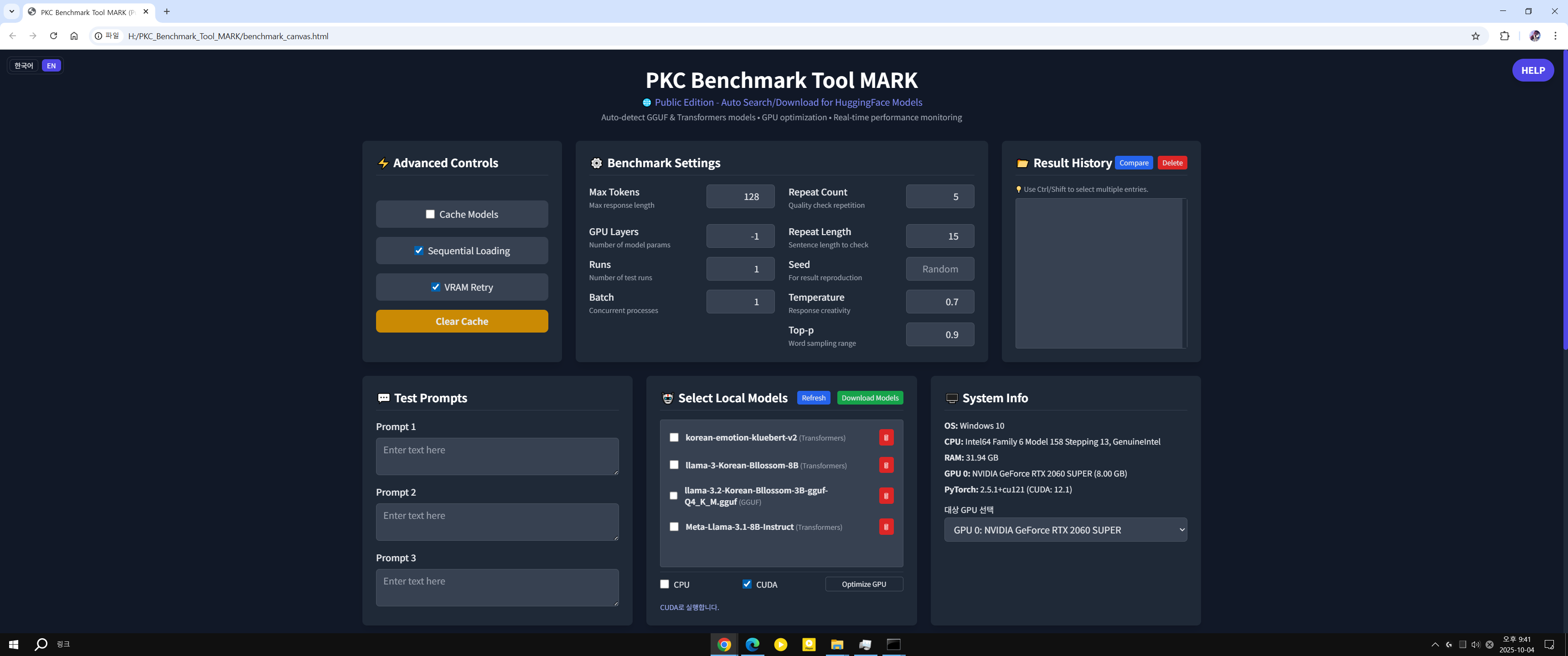

Summary Today's work focused on significantly improving the user experience (UX) of the 'GPU Optimization' feature and enhancing the clarity of the documentation (README). Initially, the GPU optimization feature required complex manual operations and did not display progress, among other issues. Through a series of modifications, it has been transformed into an intuitive process that completes with a single click, including an automatic restart. Additionally, the README document was substantially supplemented to prevent user misunderstanding of the GPU support methods for each model, thereby increasing the accuracy of the information.
1. Automation and Stability Enhancement of the GPU Optimization Process 1.1. Problem: Inconvenient Manual Server Restart and Information Not Updating Symptom: After completing 'GPU Optimization', the newly installed GPU library was not applied, and the UI's system information still displayed PyTorch: ...+cpu.
Cause: Even after the installation wizard changed the library, the already running server continued to use the old CPU version information. To resolve this, the user had to manually find and close the black console window and re-run OneClick_RUN.bat, which was cumbersome. 1.2. Solution: Implementation of an Automatic Restart System Step 1: Implemented Server Shutdown Function (benchmark_server.py):
- A new /api/shutdown API was added to allow the server to be shut down remotely from the UI.
- Logic was added to create an empty file named _RESTART_FLAG_ upon server shutdown to signal an automatic restart. Step 2: Implemented Automatic Restart Logic (OneClick_RUN.bat):
- The server execution part was wrapped in an infinite loop, and the command was changed to start /wait to wait for the server process to terminate.
- After the server terminates, it checks for the existence of the _RESTART_FLAG_ file. If the file exists, the loop automatically returns to the beginning to restart the server. Step 3: UI Integration and Enhanced Guidance (benchmark_canvas.html):
- The UI was modified to display a modal window stating "Server restart is required" upon completion of 'GPU Optimization'.
- The [Shutdown Server Now] button in the modal was linked to call the /api/shutdown API, initiating the automatic restart process. 1.3. Expected Effect Users can now complete both GPU optimization and server restart with a single click of a button in the notification window, without any complex manual operations. This dramatically improves the user experience.
2. Improved Responsiveness and Convenience During GPU Optimization 2.1. Problem: Installation Process Appeared to be 'Frozen' Symptom: After clicking the 'GPU Optimization' button, only the message "Calling wizard..." was displayed in the log window with no further response, leading users to believe the program had frozen and force-quit (KeyboardInterrupt).
Cause: The installation wizard (install_wizard.py) was downloading a PyTorch library larger than 2GB but did not show real-time progress to the UI. It only printed the result after the entire process was finished. 2.2. Solution: Implementation of Real-time Log Streaming Step 1: Forced Removal of Existing PyTorch (install_wizard.py):
- Logic was added to cleanly uninstall any existing PyTorch installation with pip uninstall before installing the new library, reducing the possibility of installation errors. Step 2: Switched to Real-time Output (install_wizard.py):
- The run function was improved to use subprocess.Popen instead of subprocess.run, allowing the output of the pip command to be sent to the UI log window line by line as it occurs. Step 3: Fixed Windows Encoding Error (benchmark_server.py):
- An issue was discovered where the server would fail to read the output from the wizard program, which included Korean characters and emojis, due to the cp949 codec problem on Windows.
- The subprocess.Popen call was modified to explicitly include the encoding="utf-8" option, ensuring stable communication across all operating systems. 2.3. Expected Effect Users can now see the currently installing items and download progress (%) in real-time during the 'GPU Optimization' process. The 'frozen' state issue is resolved, greatly enhancing user convenience.
3. Enhanced Clarity of README.md Document 3.1. Problem: Inaccurate and Misleading Information Symptom: Although GGUF models are capable of GPU acceleration, the README described them as "default CPU execution" and requiring "manual build," which could lead users to misunderstand that GGUF cannot use the GPU at all. Additionally, support for AMD (Ryzen) CPUs was unclear.
Cause: The documentation was primarily focused on the program's 'default installation policy' and lacked sufficient explanation of the actual technical behavior and the features provided to the user. 3.2. Solution: Content Reinforcement and Reorganization (README.md) Added GGUF GPU Acceleration Explanation: Clearly stated that GGUF models use GPU acceleration out-of-the-box through the 'GPU layer offloading' feature of llama-cpp-python without requiring any separate installation.
Specified CPU Support: Added a note confirming that the program runs perfectly on all CPU environments, including AMD Ryzen CPUs.
Detailed GPU Optimization Guide: Added a detailed step-by-step guide for the optimization process, from clicking the optimization button to the automatic server restart and the essential 'browser refresh (F5)'.
Improved Readability: Removed all table formats, which could break depending on the markdown viewer, and changed the formatting to a more readable list style. 3.3. Expected Effect Users can now clearly understand the differences in GPU support for each model (Transformers, GGUF) and perform the GPU optimization process without confusion, just by reading the README document. The accuracy and reliability of the information have been improved.
Overall Assessment Through today's improvements, the 'PKC Benchmark Tool' has resolved several inconveniences of its initial version and is now equipped with a user-friendly automation system and clear documentation. In particular, the complex process related to GPU optimization has been significantly simplified.