PKC AI-ONE System Build Tutorial _01
Learn how to run a local multimodal LLM with only 8GB VRAM.
Real-world architecture using GGUF, RAG, llama.cpp, and VRAM-efficient design.
1. Introduction
This article was written with the help of AI.
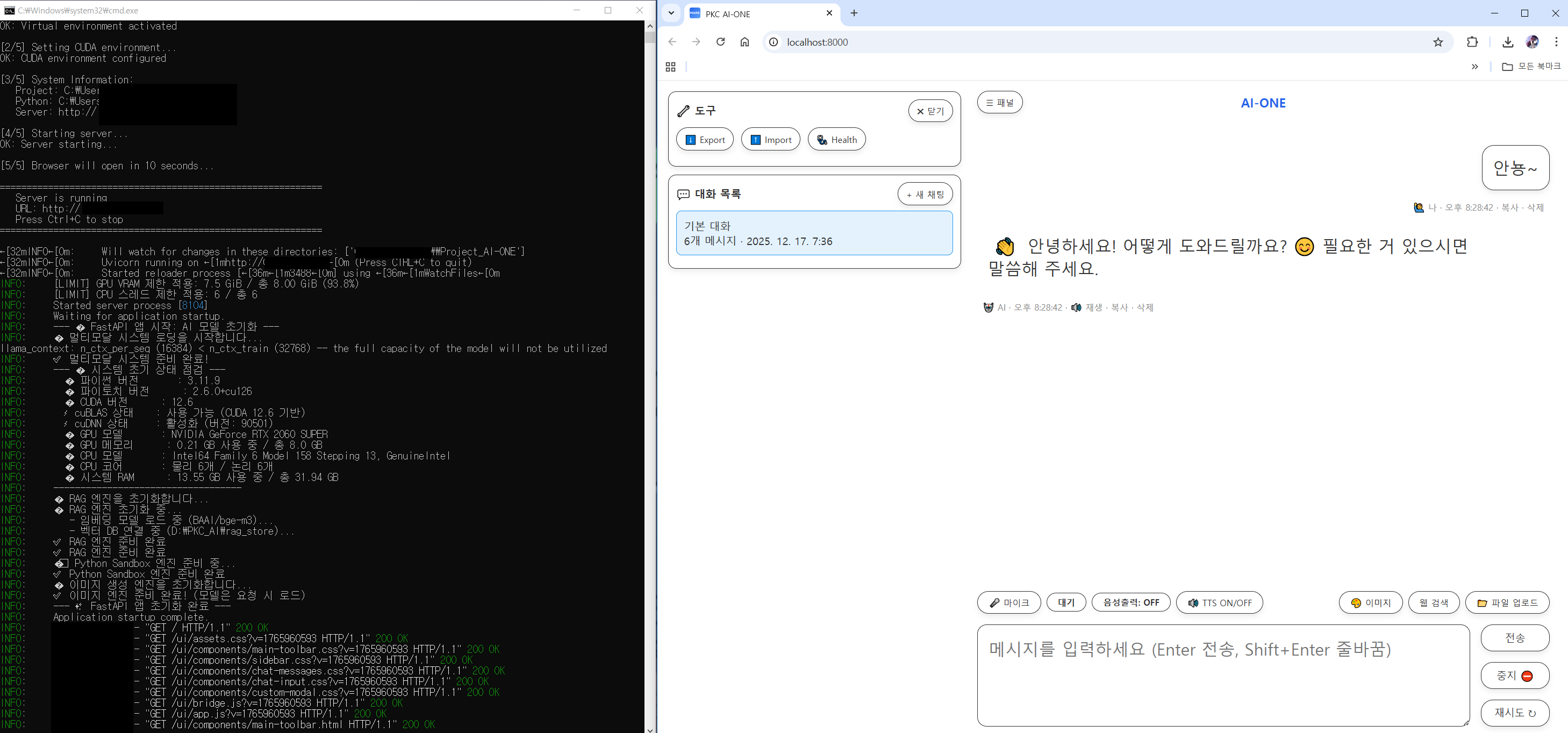
Screenshots and demo videos are intentionally omitted for now because I was lazy,
and may (or may not) be added later. 😄
When people talk about local LLMs, the discussion usually comes with assumptions like these:
- You need at least 16GB of VRAM.
- Multimodal systems only work on server-grade GPUs.
- Adding RAG makes it unrealistic on a personal PC.
But PKC AI-ONE is different.
This system is designed to operate as a single, integrated local system on a single GPU with 8GB VRAM, providing:
- Conversational LLM
- Document-based RAG
- Image understanding (VLM)
- Image generation
- Session, logging, and emotion analysis
This document is a practical record of the actual PKC AI-ONE system I am using, including its architecture, model choices, and how to build it from scratch.
Tip: If you want to build this but feel overwhelmed, a surprisingly effective approach is to let AI analyze this article and guide you through the implementation.
2. PKC AI-ONE System Overview
2.1 One-line summary
A browser-based UI + FastAPI server + GGUF LLM + RAG + multimodal system, unified through a VRAM swap strategy.
2.2 Core design philosophy
- Built freely using open-source models.
- Only one heavy model is ever loaded into VRAM at a time.
- Multimodality is solved by switching, not concurrency.
- Keep the UI lightweight; centralize logic on the server.
- Store all data locally.
3. Models in Use
The following list reflects the actual models and GGUF files loaded in PKC AI-ONE.
(For GGUF files, the quantization method is explicitly part of the filename.)
3.1 Language Model (LLM)
- Model: EXAONE-3.5-7.8B (Korean-focused)
- Runtime: llama.cpp (GGUF)
- File example: /models/EXAONE-3.5-7.8B/EXAONE-3.5-7.8B-Q5_K_M.gguf
- Quantization: Q5_K_M
- Role: Main conversation, reasoning, and code generation
- Notes:
- Supports SSE token streaming
- Unloaded and reloaded to free VRAM during multimodal tasks
Why this model
This model was not chosen because it is popular. I used my own benchmark tool, PKC Mark, to repeatedly test multiple candidate models using the same prompt sets and task categories (conversation, summarization, reasoning, coding).
In my environment (single GPU, 8GB VRAM), EXAONE-3.5-7.8B showed the best balance of output quality, stability, and generation speed.
3.2 Vision-Language Model (VLM)
- Model: Qwen3-VL-4B
- Runtime: llama.cpp (GGUF)
- VLM GGUF: /models/Qwen3-VL-4B/Qwen3-VL-4B-Q5_K_M.gguf
- Quantization: Q5_K_M
- Vision projector (mmproj): /models/Qwen3-VL-4B/mmproj-BF16.gguf
- Precision: BF16
- Role: Image description, analysis, and VQA
- Notes:
- Loaded only when needed, then immediately unloaded
- Designed for model switching rather than resident execution
Why this model
Using PKC Mark, I tested multiple VLM sizes. The 4B class offered the best trade-off between VRAM usage and recognition accuracy. Even with Q5_K_M quantization, the degradation in text and object recognition was minimal. This made it ideal for an on-demand VLM workflow.
3.3 Embedding Model (RAG)
- Model: BAAI/bge-m3
- Execution: CPU-only (GPU intentionally unused)
- Role: Document embedding and semantic search
- Notes:
- Zero VRAM usage
- Paired with persistent ChromaDB for local vector storage
3.4 Emotion Analysis Model
- Model directory: /models/korean-emotion-kluebert-v2
- Runtime: Transformers
- Role: Emotion labeling for conversation logs and statistics
- Notes:
- Used primarily for analysis and visualization, not response quality
3.5 Image Generation Model
- Model: Stable Diffusion 3.5 Medium (GGUF)
- File example: /models/SD-medium/sd3.5_medium-Q5_1.gguf
- Quantization: Q5_1
- Role: Text-to-image generation
- Notes:
- LLM is unloaded during image generation to free VRAM
- Images are returned as base64 and rendered directly in the UI
Why this model
Image generation is where VRAM–quality trade-offs matter most. PKC Mark results showed that Q5_1 was the lowest quantization level that remained stable on 8GB VRAM without excessive detail loss. The focus was on locally generatable, practical quality rather than maximum fidelity.
4. Hardware & Development Environment
4.1 Actual hardware used
PKC AI-ONE is actively running on the following single-PC setup.
- CPU: Intel(R) Core(TM) i5-9600K @ 3.70GHz (6 cores / 6 threads)
- RAM: 32GB DDR4
- GPU: NVIDIA GeForce RTX 2060 SUPER (8GB VRAM)
- Storage: NVMe SSD
This is not a server or workstation-class machine, but a fairly common desktop configuration.
4.2 Development stack
- OS: Windows 10
- Python: 3.10.x
- Backend: FastAPI + Uvicorn
- LLM/VLM runtime: llama.cpp (GGUF)
- RAG: Sentence-Transformers + ChromaDB (Persistent)
- Database: SQLite
- Frontend: HTML / CSS / Vanilla JavaScript
The goal was to keep the development environment reproducible for local developers, without special infrastructure.
5. Overall Architecture
5.1 Components
- Frontend: HTML / CSS / Vanilla JS
- Backend: FastAPI (Python)
- Database: SQLite + JSONL logs
- Vector DB: Chroma (Persistent)
5.2 Data flow
- User inputs via the browser
- SSE-based streaming communication with the server
- Server-side processing:
- RAG retrieval
- Prompt construction
- Model load / unload control
- Results streamed back to the UI in real time
6. The Core 8GB VRAM Strategy: VRAM Swapping
6.1 The problem
- LLM, VLM, and image generation models cannot coexist in VRAM simultaneously
6.2 The solution
- Enforce single heavy-task execution via VRAM_GUARD_SEMAPHORE
- Switch models based on task type
Examples
- Chatting → load LLM
- Image analysis → unload LLM, load VLM
- Image generation → unload LLM, load diffusion model
With this approach, multimodal operation becomes feasible even with 8GB VRAM.
7. Chat System (SSE Streaming)
7.1 Why SSE
- Simpler than WebSockets
- HTTP-based
- Ideal for token-level streaming
7.2 How it works
- /chat_stream_sse_fetch endpoint
- Tokens streamed as data: {...}
- [DONE] marks completion
8. RAG (Document-Based Responses)
8.1 Document ingestion
- Upload text documents
- Automatic chunking
- Embedding and storage in ChromaDB
8.2 Query time
- Embed user query
- Retrieve similar documents
- Inject references into the prompt
9. Session & Logging System
9.1 Stored data
- Session metadata
- Conversation logs
- Emotion analysis results
- Intent and keyword data
9.2 Benefits
- Conversation restoration
- Training data extraction
- Fine-tuning dataset generation
10. What This System Enables
- A fully local AI assistant
- Document-centric knowledge system
- Image analysis and generation tools
- Research and development support AI
- A personal alternative to cloud-based GPT services
11. Closing Thoughts
PKC AI-ONE aims to prove that high-end hardware is not a prerequisite for meaningful AI systems.
The 8GB VRAM constraint ultimately led to:
- Simpler architecture
- More deliberate resource management
- A sharper focus on what actually matters
I hope this document serves as a realistic starting point for anyone interested in building their own local AI system.
(Whenever it happens…)
Next: Code walkthroughs and step-by-step implementation
'AI-ONE > English Translation' 카테고리의 다른 글
| Local all-in-one AI system (Local multimodal AI) (5) | 2025.11.15 |
|---|